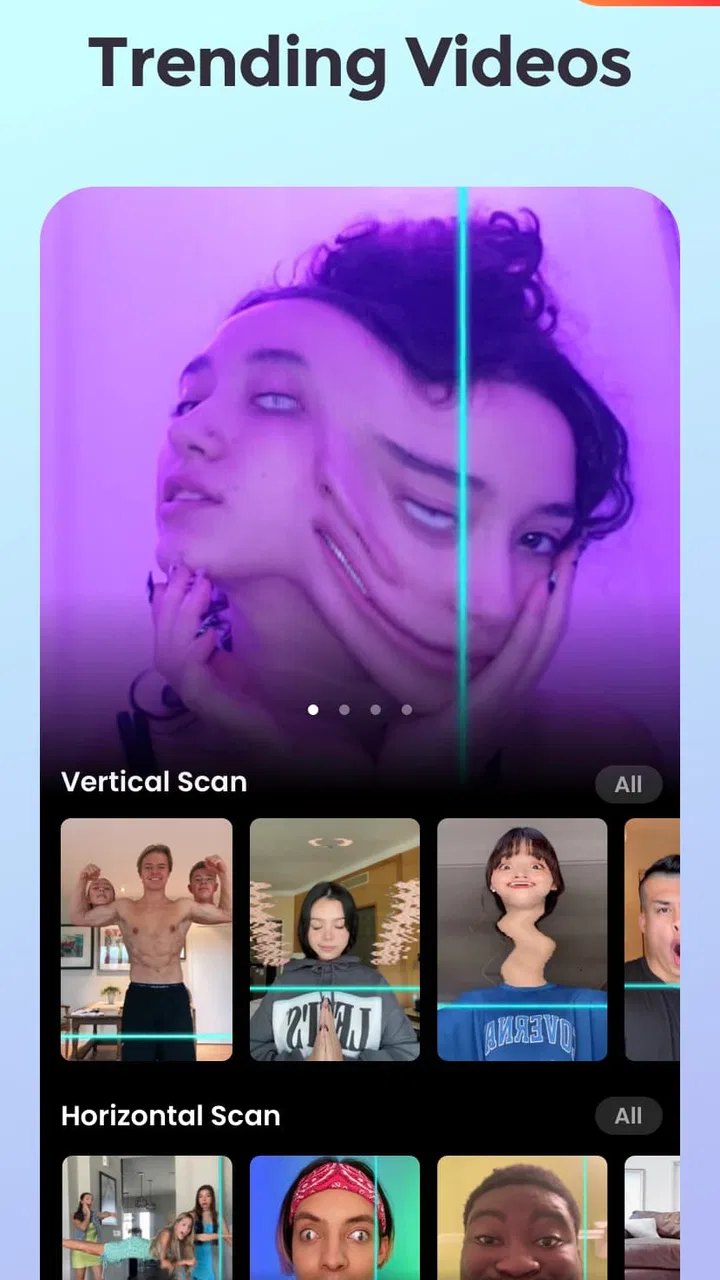
Time Warp Scan - Face Scan
- 4.5
- Rating
- 10.00M
- Installs
- Free
- Price

 Analysis by App-foxy
Time Warp Scan - Face Scan is a free photography app built around one very specific idea: turning a moving scan effect into strange, funny portraits and short visual experiments. I found it most enjoyable when I stopped treating it like a normal camera and used it as a tool for quick visual jokes. The result is less about taking a technically perfect photograph and more about creating an image that makes someone look twice.
The app comes from Photo Collage & Grid - Foto Grid, and its focus is clearly the time-warp effect rather than a broad editing workspace. That narrow purpose is also its appeal. You do not have to learn a complicated timeline or spend ages adjusting color. You choose the effect, frame the subject, and try to keep the phone moving in a controlled way while the scan changes the appearance of the scene.
It is available at no cost and is suitable for Everyone. The current version is 3.1.0, and it runs on Android 8.0 or later. Its popularity is easy to understand: the app has passed 10 million installs, with a 4.2 average from roughly 35 thousand ratings. Those figures do not make every result brilliant, but they do show that the simple scan concept has found a substantial audience.
You May Also Like

 Google Keep - Notes and lists
Google Keep’s Quiet Growth Shows the Appeal of Simpler Notes
As mobile work gets busier, Google Keep keeps winning a simple contest: capture a thought quickly, find it later, and get on with the day.

 Blood Strike: 2.5 Anniversary
Blood Strike’s Loadouts Turn Every Drop Into a Tactical Gamble
A close look at Blood Strike’s custom loadouts: how fast access to signature weapons reshapes its battle royale rhythm, rewards preparation, and narrows the gap between fights.

 Pandora - Music & Podcasts
Pandora’s Music Is Easy to Start, but Harder to Recover
Pandora’s strength is its low-effort path from a seed to a station. Its weak spot is how much confidence it asks you to place in connection, setup, and quiet recovery.

 8 Ball Pool
 Is Built on Rivalries, Rematches, and Routine
A close look at the rivalries, rematches, shared routines, and unanswered safety questions that turn a quick pool match into a persistent mobile community.

 Samsung Music
’s Quiet Strength Is Playing What You Already Own
Its reach comes less from spectacle than from dependable access to a personal library. That simplicity is both the app’s strongest retention engine and its ceiling.

 AccuWeather: Weather Radar
AccuWeather Review: A Quick, Clear Forecast for Everyday Decisions
For everyday plans, the best forecast is the one you can understand quickly. AccuWeather makes rain timing, radar, and local conditions easy to act on, with a few trade-offs.
More From Our News Desk



Why the time-warp scan is the whole experience
The central capability is a scanning frame that captures a scene progressively instead of recording it as one ordinary instant. That difference is what creates the stretched, split, or oddly rearranged look. A face can appear unusually wide, a smile can become uneven, or two positions can seem to coexist in one image. The effect is intentionally unpredictable, but it is not completely random: your movement, the subject’s movement, and the direction of the scan all influence the final picture.
In my experience, the best way to think about it is as a visual timing game. A regular camera rewards stillness and good composition. This app rewards coordination. You are trying to make the phone’s scan pass through the subject at the right moment, while the person in front of the camera follows a simple instruction. Once I understood that, failed attempts became useful rather than frustrating. A strange result often suggested a better idea for the next try.
The strongest part of the app is not realism; it is controlled distortion. That makes it a natural fit for playful portraits, reaction images, quick social posts, and experiments with hair, facial expressions, or body position. It is not the tool I would choose for a family record, a clean profile photo, or a carefully edited travel image. Its value comes from making an ordinary camera moment feel unusual.
How the scan changes the way you take a photo
When I used the effect, I got better results by giving the subject one clear instruction rather than several. For example, asking someone to keep their head still while changing only their expression produced a more readable distortion than asking them to move their whole body. The scan needs a little cooperation. If everyone moves at once, the final image can become so chaotic that the intended joke disappears.
Lighting also matters, even though this is meant to be a casual effect. A bright, evenly lit face is easier to read than a face partly hidden in shadow. A plain background makes the distortion stand out, while a busy room can create extra lines and shapes that compete with the subject. I found that a simple wall, a window-lit room, or an uncluttered outdoor spot usually gave more satisfying results than a crowded background.
Phone movement is another practical detail. A slow, steady motion gives you more control than a sudden sweep. I recommend holding the device with both hands when possible and keeping the subject roughly in the same part of the frame. Small errors can be funny, but a large wobble tends to look like an accidental blurry photo rather than a deliberate effect.
The app is therefore more interactive than its short description might suggest. The person taking the picture is directing a tiny performance, and the person being scanned is part of the editing process. That makes it particularly good for two people using one phone together. It is less satisfying if you want to press a button once and receive a polished result without experimenting.
A practical workflow for better results
I would start with three quick attempts instead of trying to perfect the first one. On the first pass, keep the subject still and learn how the scan behaves. On the second, change only one element, such as a smile, a raised eyebrow, or the position of one hand. On the third, use the most successful timing and add a more exaggerated pose. This small progression makes it easier to understand what caused the distortion.
One useful trick is to separate the visual idea from the pose. Decide first what the image should communicate: a comically stretched face, a split expression, or an impossible-looking posture. Then choose a movement that supports that idea. Without this step, it is easy to collect odd images that are technically distorted but not especially entertaining.
Another practical tip is to leave space around the subject. If the face is already pressed against the edge of the frame, the scan has less room to create a convincing shape. Framing from the chest upward can work better than filling every corner with a close-up. This is especially helpful when the subject wants to move a hand or tilt their head without being cut off.
I also recommend reviewing the result immediately and deciding what to change rather than repeating the exact same motion. If the face looks stretched in the wrong direction, adjust the phone’s path. If the expression is lost, ask the subject to exaggerate it earlier. The app becomes much more rewarding when each attempt is treated as a small test instead of a lottery.
The everyday situation where it makes the most sense
The best scenario I found was a casual gathering where people were already taking silly photos. One person can hold the phone while another tries a sequence of expressions, and everyone can react to the results immediately. It works well as a quick activity because there is no need to prepare props, understand editing controls, or create a long video. The fun comes from seeing how a familiar face changes when timing and movement are slightly manipulated.
It can also work for a short social post when the goal is to catch attention quickly. A normal portrait may be attractive, but a deliberately warped face creates a question: how was that made? I would still choose the strongest result rather than uploading every attempt. The effect is more effective when the image has a clear visual punch and is not surrounded by several nearly identical experiments.
For solo use, the experience is more limited but still possible. You can position the phone, prepare a pose, and try to keep your movement consistent. The challenge is that you cannot easily see the scan’s progress while performing. I preferred using it with another person because a friend can guide the timing and suggest a better pose. If you mainly take self-portraits alone, a conventional camera with a timer may be more convenient.
Families and younger users may enjoy the immediate surprise, especially because the content rating is Everyone. I would still treat it as a shared creative activity rather than assuming every child will understand how to frame themselves safely. The app’s appeal is visual and simple, but the quality of the result depends on sensible use of the phone and enough space to move without bumping into anything.
Where it falls short compared with regular photo editors
The biggest trade-off is specialization. A standard camera app gives you dependable still images. A collage editor gives you layouts, text, and several ways to combine pictures. A general photo editor gives you control over exposure, color, cropping, and retouching. Time Warp Scan - Face Scan does not replace those tools. It is better understood as a novelty camera for one recognizable visual treatment.
That narrow focus can make the app feel repetitive if you are not actively inventing new situations. After several attempts with the same face and the same background, the surprise wears off. The solution is not endless repetition; it is changing the subject, the pose, the setting, or the story behind the image. If you want a large library of unrelated filters, this app may feel too focused.
There is also a quality trade-off between speed and precision. The effect is designed for quick experimentation, so the result may contain awkward edges or uneven features. Those imperfections are often the joke, but they can also make an image look unfinished. Users seeking polished portraits should use a normal camera first and edit afterward, rather than expecting this scan to produce a professional-looking photograph.
The free entry point is helpful for trying the concept, while in-app purchases range from $2.49 to $38.99 per item. I would be cautious about paying before deciding how often the effect fits into your routine. For occasional laughs, the free experience may be enough. Someone who uses creative camera effects frequently may consider extra purchases more worthwhile, but the value depends on whether the available additions genuinely expand the kind of images they want to make.
Another point to consider is storage and sharing habits. A scan-based experiment often takes several attempts before one feels worth keeping. If you record every failed version, your gallery can fill with near-duplicates. I found it better to review each result immediately, keep the strongest image, and remove the rest. This simple workflow makes the app feel much less cluttered over time.
Small techniques that make the effect more convincing
For a face-focused result, keep the background quiet and ask the subject to exaggerate one feature rather than moving everything. A large smile, a raised eyebrow, or a deliberate head turn gives the scan a clear visual target. Subtle expressions can disappear, particularly when the person is also trying to follow movement instructions.
For a more surprising composition, place one object near the subject but do not let it dominate the frame. A hat, a cup, or a hand can create a second point of distortion. The important trade-off is clarity: one extra element can make the image more interesting, while several objects can make it difficult to understand what changed.
Timing is especially useful when working with two people. One person can remain still while the other changes position, creating a contrast between a stable face and a distorted gesture. This is more reliable than asking both people to perform large movements at the same time. It also gives the final image a clearer subject, which helps viewers understand the joke immediately.
For a group, I would avoid placing everyone tightly together. Leave visible separation between faces so the scan does not turn the whole scene into an unreadable cluster. If the group wants a deliberately chaotic picture, that can be fun, but it should be an intentional choice rather than the result of running out of space.
Who will get the most from it
I think the app is best for people who enjoy visual experimentation and do not mind taking several tries. It suits friends making humorous portraits, creators looking for a quick unusual clip or image, and anyone who likes camera effects that depend on performance rather than passive decoration. It is also a good introduction to creative photography for someone who finds full editing suites intimidating.
It is less suitable for photographers who care about consistent image quality, detailed manual control, or natural-looking portraits. It may also disappoint users expecting a broad social-video editor, because the main attraction is the scan effect itself rather than a complete production workflow. If your priority is organizing albums, correcting lighting, or building polished collages, another photography tool will serve you better.
The app’s reception reflects a solid but not flawless experience, with around 1.3 thousand written reviews contributing to its overall store presence. I would describe it as dependable for its intended joke-making purpose, but not as an all-purpose camera. That distinction matters: the right question is not whether it replaces every other photo app, but whether you want this particular kind of distortion often enough to keep it installed.
Photo Collage & Grid - Foto Grid has kept the concept accessible by making the main interaction easy to understand. You do not need photography knowledge to begin, yet there is enough timing and framing involved to reward practice. The learning curve is short, but the creative ceiling depends on your ideas more than on complex controls.
My recommendation after using the concept repeatedly
I recommend Time Warp Scan - Face Scan if you want a focused, playful camera for unusual portraits and quick visual jokes. Its strongest quality is the way it turns a simple scan into a shared activity: one person performs, another guides the phone, and the result becomes the punchline. The app is free to try, works on relatively older Android versions, and does not demand the patience of a full editor.
I would skip it if you need dependable portraits, detailed retouching, or a complete photo-creation suite. The effect can be repetitive, unsuccessful attempts are common, and the most entertaining results usually require cooperation and a little planning. Those are not flaws for the intended audience, but they are important limitations for anyone expecting a conventional camera.
For me, the deciding factor is whether you enjoy the process as much as the final image. When I used a clear pose, a simple background, and a deliberate movement, the app produced results that felt genuinely different from ordinary filter photos. When I rushed or tried to make too much happen at once, it became messy. Used with that expectation, this is a fun specialist tool rather than a replacement for your everyday camera.
FAQs for Time Warp Scan - Face Scan
01What is Time Warp Scan - Face Scan and how does it work?
Time Warp Scan - Face Scan is a fun and creative app that uses a moving line filter to create unique and entertaining effects on photos and videos. As the line moves across the screen, it captures and freezes parts of the image, allowing users to manipulate and distort their faces or surroundings in imaginative ways.
02Is Time Warp Scan - Face Scan free to use?
Yes, Time Warp Scan - Face Scan is free to download and use, offering a variety of features at no cost. However, the app may include optional in-app purchases or advertisements to enhance the user experience, such as unlocking additional filters or removing ads.
03What devices are compatible with Time Warp Scan - Face Scan?
Time Warp Scan - Face Scan is available for both Android and iOS devices. It requires a smartphone or tablet with a functioning camera and an operating system that supports app downloads from the Google Play Store or Apple App Store. Ensure your device meets the app's compatibility requirements before downloading.
04Can I share my creations from Time Warp Scan - Face Scan on social media?
Absolutely! Time Warp Scan - Face Scan allows users to easily share their creative photos and videos directly to social media platforms like Instagram, TikTok, and Facebook. The app provides quick sharing options to help you showcase your fun and artistic creations with friends and followers.
05Are there any privacy concerns with using Time Warp Scan - Face Scan?
Time Warp Scan - Face Scan respects user privacy and typically requires access to your device's camera and storage to function properly. It’s important to review the app’s privacy policy to understand what data is collected and how it is used. Users should always be cautious and ensure they are comfortable with the permissions requested.
Pros
- Fun and engaging for creative selfies.
- Easy-to-use interface.
- Offers various filters and effects.
- No registration required.
- Quick processing time.
Cons
- Limited customization options.
- Ads can be intrusive.
- No offline mode available.
- Requires camera permissions.
- Some effects may lag.

Time Warp Scan - Face Scan
Gallery